Holes sorting
Application Area:
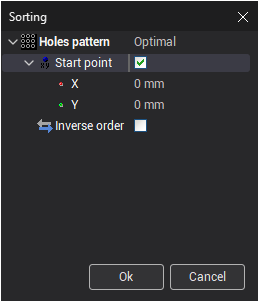
The holes sorting window allows you select one of the type of sorting using some parameters to sort holes list.
Sorting patterns
The system has four pattern of holes sorting: Rectangular, Circular (Rings), Circular (Sectors), Optimal.
Rectangular
The pattern Rectangular allows you to sort the holes along XY rows. This type of sorting has the following parameters:
 — starting position of calculation rows
 — angle to rotate rows
 — distance between rows
 — direction to calculate drilling trajectories (Available values: Top-down, Bottom-up)
 — order of moving between rows (Available values: One way, ZigZag, Optimal)
 — change order in the opposite direction
If Start point is unchecked then the system will select first hole of drilling trajectories.
Circular (Rings)
The pattern Circular (Rings) allows you to sort the holes along the rings located from specified center. T his type of sorting has the following parameters:
 — center of calculation rings
 — angle to set start position
 — distance between center and first ring
 — distance between rings
 — direction to calculate drilling trajectories (Available values: Clockwise, Counter-clockwise)
 — direction to calculate drilling trajectories (Available values: Outside to inside, Inside to outside)
- — order of moving between rings (Available values: One way, ZigZag, Optimal)
Circular (Sectors)
The pattern Circular (Sectors) allows you to sort the holes using sectors of a circle. T his type of sorting has the following parameters:
- — center of calculation sectors
- — angle to set start position
 — distance between sectors (There are two input mode: Count and Degrees)
- — direction to calculate drilling trajectories (Available values: Clockwise, Counter-clockwise)
- — direction to calculate drilling trajectories (Available values: Outside to inside, Inside to outside)
- — order of moving between sectors (Available values: One way, ZigZag, Optimal)
Optimal
The pattern Optimal is similar to Optimal in Strategy except for configurable settings.
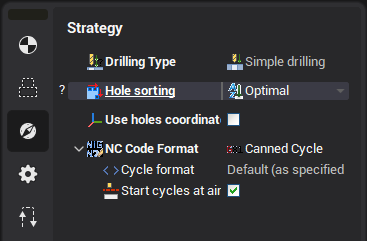
This type of sorting has the following parameters:
- — starting hole to calculation optimal drilling trajectories
- — change drilling trajectories in the opposite direction
If Start point is unchecked then the system will select first hole of drilling trajectories.