Help button of main panel
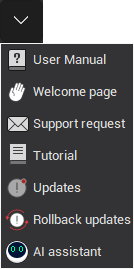
The Help menu consists of actions that allow you to find answers to any questions that may arise.
| Button | Description |
|---|---|
 |
User Manual: Shows the CAM system help. |
 |
Welcome page: Opens a page with up-to-date information from the CAM system website. |
 |
Support request: Prepares a message to the technical support service of ENCY SOFTWARE LTD., e-mail: support@encycam.com. |
 |
Tutorial: Runs the CAM system tutorial. |
 |
Updates: Checks for available updates. |
 |
Rollback updates: Rollback to a previous version of the software, if necessary. |
 |
AI Assistant: A virtual assistant that helps users with various aspects of the CAM workflow. |