Combo Finish
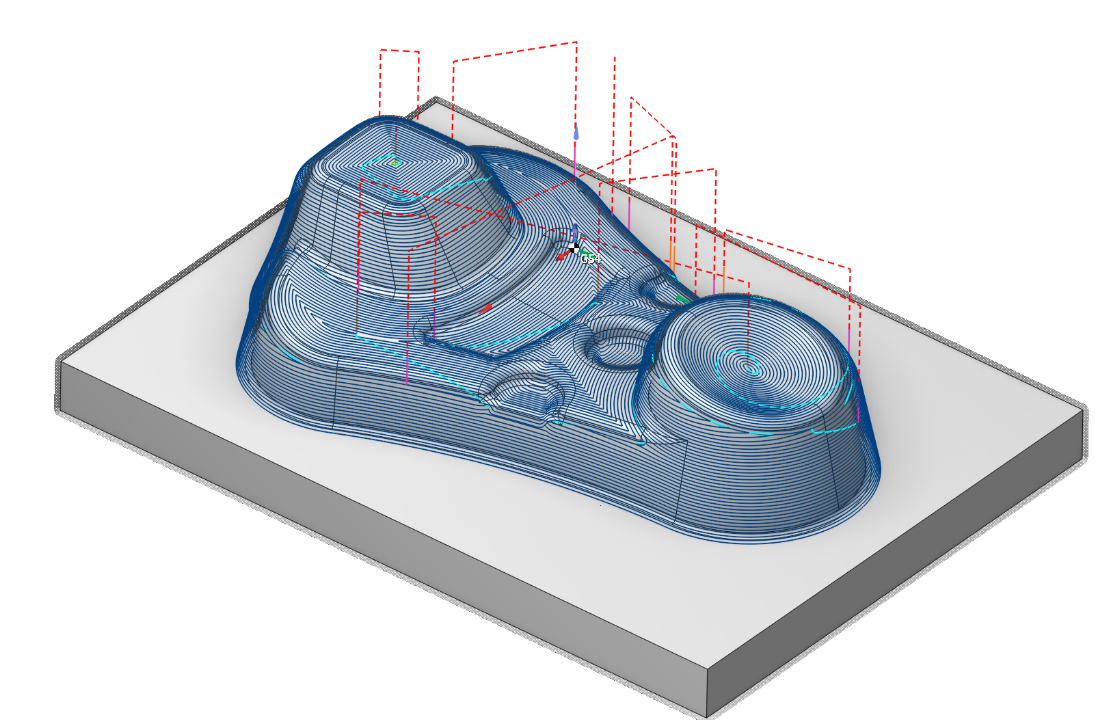
Application area:
This operation can replace outdated legacy operations and address associated issues.
Advantages:
Support for generating helices for waterline passes (helical machining).
In combined strategies, gentle and steep areas are processed using different strategies. This ensures a uniform scallop pattern on the surface and improves cutting conditions.
Combined strategies feature smoothing/merging of machining zones based on the Smooth distance parameter. This helps produce a more solid toolpath with fewer unnecessary passes and transitions.
Intelligent toolpath merging for combined strategies has been implemented.
The calculation process is fully parallelized.
Setup:
The Setup tab is used to configure the primary parameters of the project. This can involve the positioning of the part on the equipment, the coordinate system of the part, and more. Details
Job assignment:
Machining surfaces. Select various surfaces of the part as the working task. The system will calculate the trajectory based on the chosen surfaces. Details
Restrict surfaces.
Job Zone. Job zones are used to define the part areas that have to be machined by roughing and finishing milling operations. Details
Restrict Zone. In addition to Job Zones in system you can use Restrict Zones to specify the workpiece areas that have not to be machined in the current operation. Details
Top Level. Specifying the top level by model elements. Details
Bottom Level. Specifying the bottom level by model elements. Details
Properties. Displays the properties of an element. For a surface set, Axial stock and Radial stock are added to operation stocks; radial equals axial by default. You can also call this menu by double clicking on an item in the list.
Delete. Removes an item from the list.
Restrictions. It allows you to restrict areas that should not be machined. Details
Strategy:
Strategy.
This parameter enables the user to create a toolpath with different strategies.
Click here to expand..
Plane. The plane finishing is designed for the machining of smooth areas of a model's surfaces, and also for areas close to vertical, whose (steep) trajectories are along the toolpath.
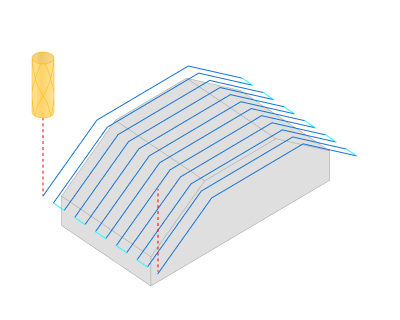
Waterline. The waterline finishing gives a good result when machining models or their parts that have their main surface areas close to vertical.
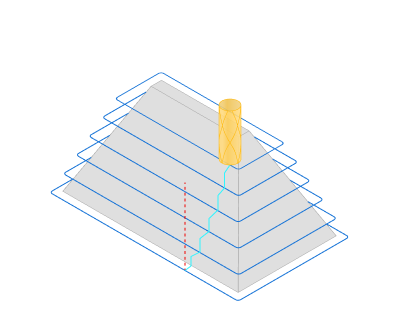
Scallop. The Scallop toolpath starts from the curves lying on the part surfaces and is generated by repeatedly offsetting those curves inwards until the curves collapse. This method creates a toolpath similar to equidistant strategy.
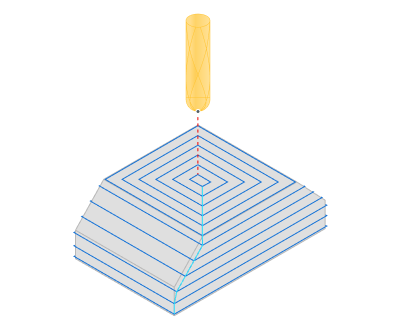
Plane + Waterline. The plane toolpath machines only areas with the slope angle less than the Split slope angle while the waterline toolpath machines areas where the surface slope angle is greater than the Split slope angle. By default the split slope angle is set to 45 degrees. This strategy ensures that shallow areas are machined with the plane toolpath, and steep areas are machined with the waterline toolpath.
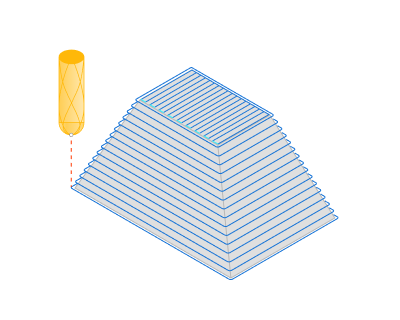
Scallop + Waterline. The plane toolpath machines only areas with the slope angle less than the Split slope angle while the waterline toolpath machines areas where the surface slope angle is greater than the Split slope angle. By default the split slope angle is set to 45 degrees. This strategy ensures that shallow areas are machined with the scallop toolpath, and steep areas are machined with the waterline toolpath.
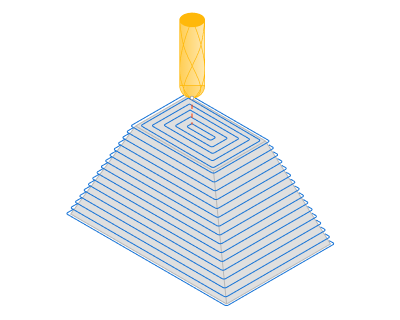
Step. Material removed in one pass along the tool axis between the Top and Bottom levels.
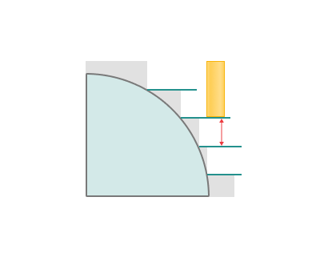
Clear flats. Adds waterline passes at horizontal flat levels. Enabled by default, shown except for Plane, and affects the waterline part of the toolpath.
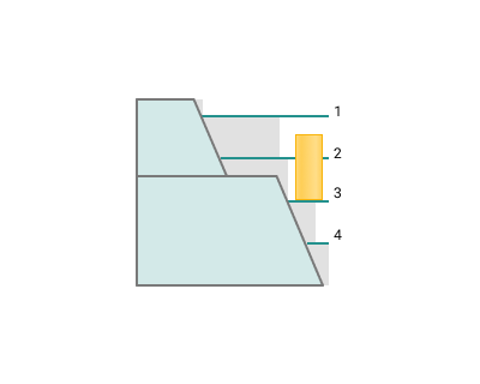
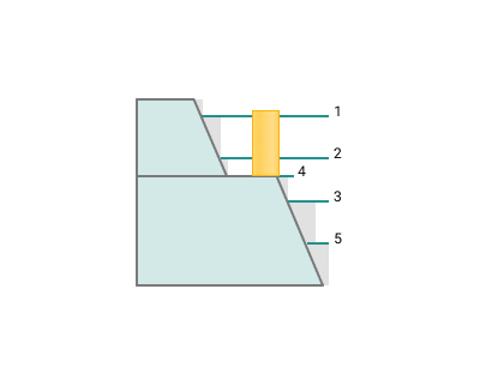
Adaptive step. Keeps the step along the surface rather than in projection, adding passes on inclined areas so the surface distance does not exceed Step. Not available for the Scallop strategy.
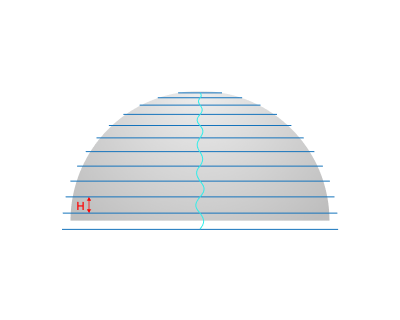
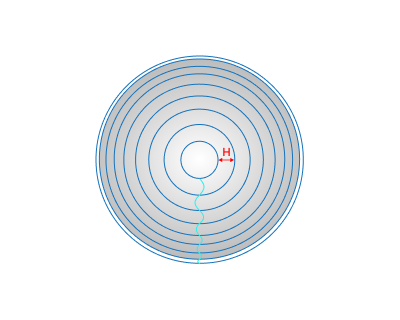
Scallop. Limits the scallop height between neighbouring passes; the Step remains the maximum. Not available for the Scallop strategy and ignored when Adaptive step is enabled.
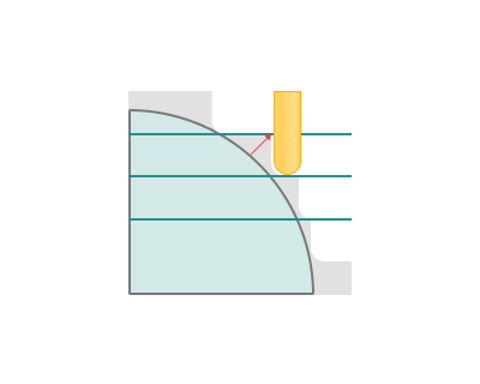
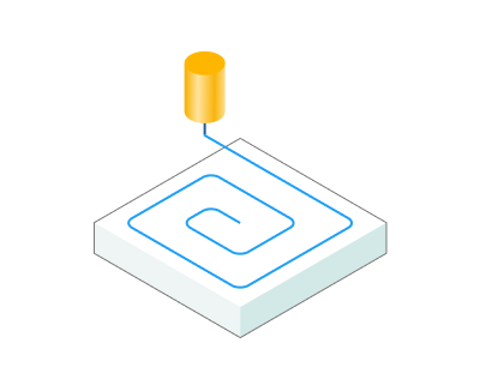
Spiral Machining. Setting the flag configures the toolpath as a continuous spiral to minimize links.
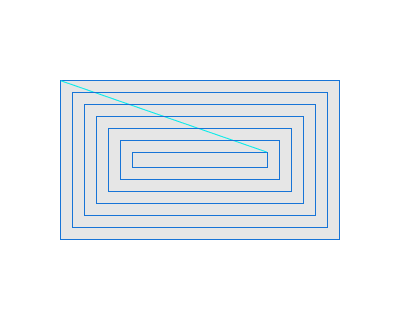
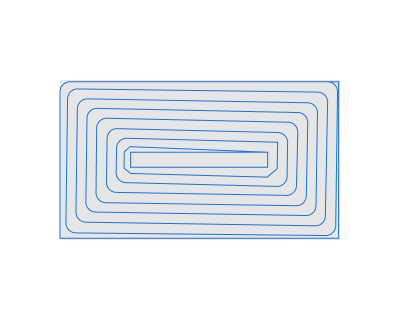
Corners smoothing. Rounds sharp corners with the specified Radius to reduce deceleration. Works with all strategies.
.png)
.png)
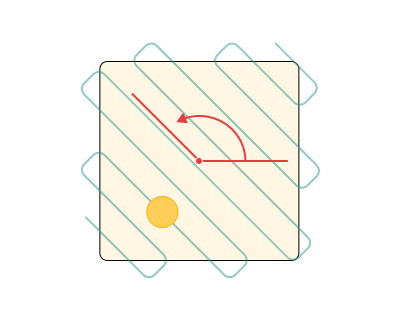
Angle. Assigns the cut angle direction for the plane operations.
Milling type.
Сan be assigned in almost all operations, except for the curve machining operations. This allows the user to control the required milling type (climb or conventional) during the toolpath calculation process. This parameter group works similarly to the Waterline roughing operation. Details
Sorting.
Controls the sequence of toolpath passes during the surface machining.
Click here to expand..
Start Point. The point defining the beginning of the plunge.
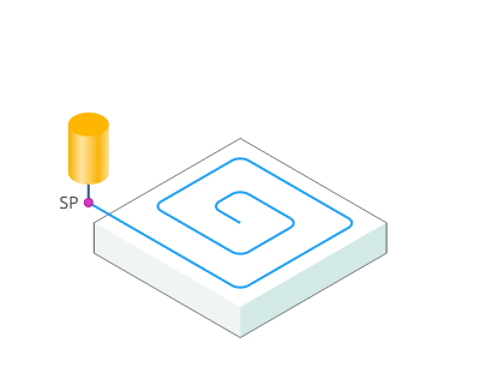
Start point shift. Shifts each next closed pass start to avoid one seam. Default 300 %. Not applied with Spiral machining.
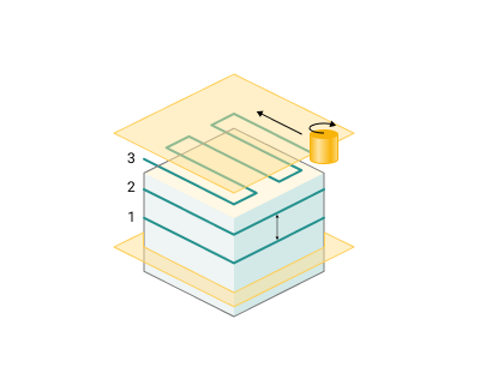
Machining order.
Downwards. For models, which have surface areas close to the vertical, machining downwards is recommended.
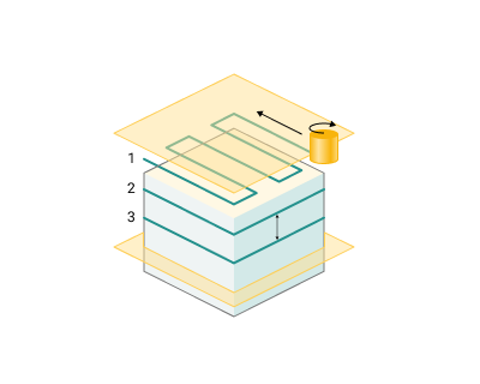
Upwards. Machining upwards is advised for use on models with form-creating surfaces which are closer to horizontal.
Job zone.
Enables additional modification of the working area initially selected on the Job assignment tab.
Click here to expand..
Surface roll type. Surface only (default) machines selected surfaces only; With edges also rolls over surface edges. Takes effect when Check part is enabled.
Min slope angle. The default value is 45 degrees; when disabled, no minimum limit is applied. Not shown for Scallop. In the system it is possible to perform selective machining of the model surface areas, depending on the angle between the normal to the surface and the vertical axis Z. The range being machined can be defined by the minimum and maximum slope angles.
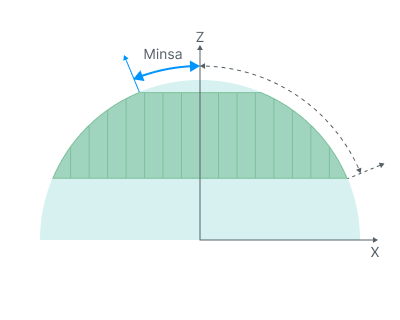
Max slope angle. The default value is 45 degrees; when disabled, no maximum limit is applied. In the system it is possible to perform selective machining of the model surface areas, depending on the angle between the normal to the surface and the vertical axis Z. The range being machined can be defined by the minimum and maximum slope angles.
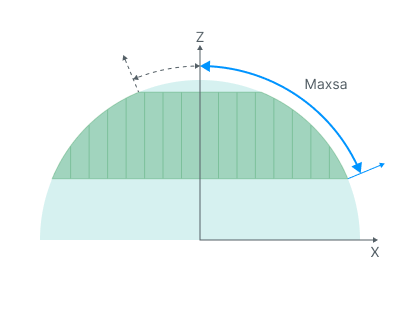
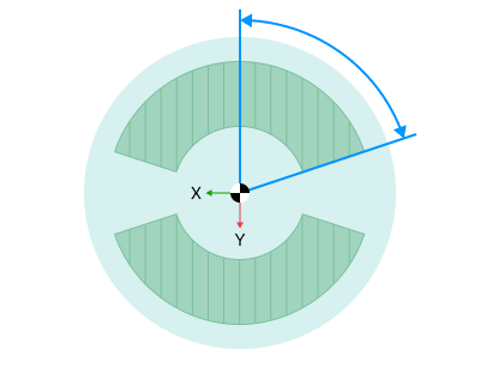
Frontal angle. The frontal angle is the angle between projections onto the horizontal plane of the tool movement direction and the normal to the surface at the cutting point. Details
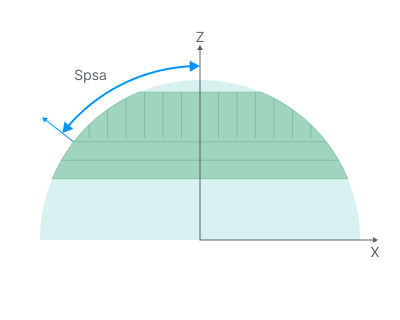
Split slope angle. Angle between vertical and horizontal passages.
Merge distance. Sets the distance used to smooth and merge adjacent machining regions in the combined strategies (Plane + Waterline, or Scallop + Waterline). Neighbouring areas located within the specified distance are joined into a single continuous region, which eliminates short, fragmented passes and produces a smoother, more uniform toolpath.
Machining levels.
It defines the range along tool axis for the machining. This parameter group works similarly to the Waterline roughing operation. Details
Corners smoothing.
When there is a sudden change of the tool direction, the milling control performs deceleration before starting the turn, and then accelerates again. This fact can lead to vibrations and high tool and milling machine wear. The problem can be solved if the toolpath has very few or no breaks. For this reason, in the system there is the toolpath smoothing function using the defined radius for machining inner or outer corners of the model.
Trimming.
Hole capping closes openings with a default diameter of 2 x tool diameter. Allows for the skipping of surfaces not intended for machining and allows for the extension of the toolpath. Some parameter group works similarly to the Waterline roughing operation. Details
Parameters:
For this operation, Check workpiece includes Radial ignore thickness, Axial ignore thickness, and Theoretical rest material.
This tab contains the main parameters for controlling the part, workpiece, fixture and other items, which allow you to change the trajectory. Details
Links/Leads:
In the Links/Leads tab, you define the parameters for rapid movements. These movements include tool approach from the tool change position, engage to the start of the working stroke, retraction after the final cutting motion, transitions between working passes, and return to the tool change point. You can configure the sequence of movements along the coordinates, the trajectory of these motions, and the magnitude of displacements.
Click here to expand..
Сonsists of:
Approach/Return. This group of parameters manages the tool movements from the tool change position to the start of the engage toolpathes, and back. Details.
Links. Defines the rules governing Entry/Exit links and links between work moves. Details.
Leads. Allows you to add additional engage and retract to the working moves using their feed. Details.
Safe motions. Defines the type of Safety Surface and the distance from the workpiece to it. This surface facilitates transitions between the processed surfaces or tool paths, and the first stage of approach or return occurs toward it. Details.
Advanced links settings. This group of parameters specifies the features of trajectory formation for primarily five-axis operations, considering optimal movements of rotational axes. Details.
Distances. Distances used in Links rules Details.
Feeds/Speeds:
Using this dialogue the user can define the spindle rotation speed; the rapid feed value and the feed values for different areas of the toolpath. Spindle rotation speed can be defined as either the rotations per minute or the cutting speed. The defining value will be underlined. The second value will be recalculated relative to the defining value, with regard to the tool diameter. Details
Transformations:
Parameter's kit of operation, which allow to execute converting of coordinates for calculated within operation the trajectory of the tool. Details.
Part:
A Part is a group of geometrical elements that defines the space to check for gouges. Details
Workpiece:
A workpiece model of an operation defines the material to be machined. Details
Fixtures:
As the Fixtures the fixing aids such as chucks, grips, clamps, etc., and the restriction areas of any other nature are usually specified. Details