Links for 3D/5D advanced operations
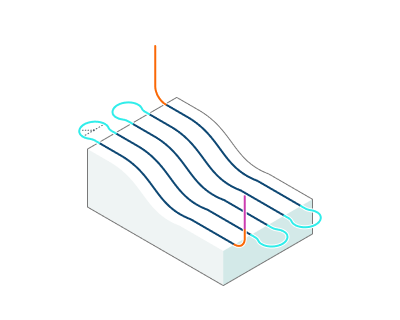
Application Area:
Defines the rules governing Entry/Exit links and links between work moves.
Start point shift (For additive operations).
Click here to expand..
The start point shift relative to the previous layer allows to get a more even distribution of zones where the feed of material starts/stops and where the quality of the formed surface is usually lower.
Note: For "Non-planar slicing" operation this option is available only if "Start points" parameter on the "Strategy" page is set to "Auto" or "Custom for first layers" mode.
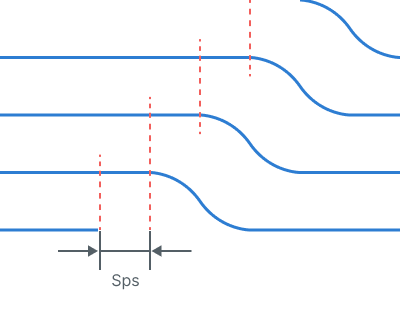
Sps - Start point shift
Entry/Exit links. Defines the general rule of approach/return.
Click here to expand..
Straight.
With this rule, the approach to the part is carried out: 1. Tool change position 2.Appr- Approach 3. LD - Leads (If they are enabled) The returnl is carried out in the reverse order: 1. LD - Leads (If they are enabled) 2.Ret - Return 3. Tool change position
.png)
By Feed Distance.
With this rule, the approach to the part is carried out: 1. Tool change position 2.Appr- Approach 3. FD - Feed distance 4. LR - Linking Radius (depends on the type of Leads. If the Leads is located vertically, then as a rule, the arc is not built) 5. LD - Leads (If they are enabled) The returnl is carried out in the reverse order: 1. LD - Leads (If they are enabled) 2. LR - Linking Radius (depends on the type of Leads. If the Leads is located vertically, then as a rule, the arc is not built) 3.FD - Feed distance 4.Ret - Return 5. Tool change position
.png)
By Rapid Distance.
With this rule, the approach to the part is carried out: 1. Tool change position 2. Appr- Approach 3. RD - Rapid distance 4. FD - Feed distance 5. LR - Linking Radius (depends on the type of Leads. If the Leads is located vertically, then as a rule, the arc is not built) 6. LD - Leads (If they are enabled) The returnl is carried out in the reverse order: 1. LD - Leads (If they are enabled) 2. LR - Linking Radius (depends on the type of Leads. If the Leads is located vertically, then as a rule, the arc is not built) 3. FD - Feed distance 4. RD - Rapid distance 5. Ret - Return 6. Tool change position
.png)
On Safe Surface.
With this rule, the approach to the part is carried out: 1. Tool change position 2.Appr- Approach 3.SL - Safe level 4. FD - Feed distance 5.LR - Linking Radius (depends on the type of Leads. If the Leads is located vertically, then as a rule, the arc is not built) 6. LD - Leads (If they are enabled) The returnl is carried out in the reverse order: 1. LD - Leads (If they are enabled) 2. LR - Linking Radius (depends on the type of Leads. If the Leads is located vertically, then as a rule, the arc is not built) 3. FD - Feed distance 4. SL - Safe level 5. Ret - Return 6. Tool change position
.png)
Short links/Long links. Defines the rule for transition between work moves.
Click here to expand..
Straight. Links are made by the shortest distance.
.png)
Smooth. Links are made by a smooth spline curve.
-1.png)
High Speed. Links are made by a smooth curve in such a way that the Link radius is nowhere exceeded.
-1.png)
By Feed Distance.
The links made from from the Feed distance. Additionally transition curves may be smoothed by the Link radius. FD - Feed distance LR - Link radius
.png)
By Rapid Distance.
The links made from from the Linking Radius and Rapid distance. RD - Rapid distance LR - Linking Radius
.png)
On Safe Surface.
The links made from from the Linking Radius + Feed distance to the Safe level. LR - Linking Radius FD - Feed distance SL - Safe level
.png)
On Offset Surface.
Works as a displacement of the treated surface by a distance Feed distance. Works with milling type: Climb, Conventional. FD - Feed distance
.png)
Short link max distance. Sets the maximum distance at which links are made by the short link type.
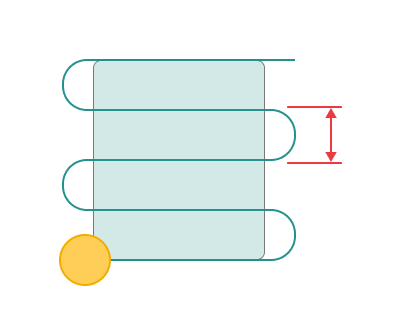
Linking Radius.
Click here to expand..
Link radius sets the radius of smoothing for
- Highspeed links - Feed distance links (depends on the type of Leads. If the Leads is located vertically, then as a rule, the arc is not built)
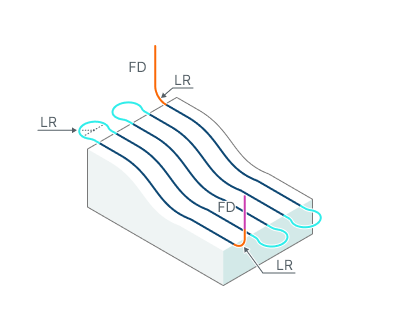
FD - Feed distance LR - Link radius
Vertical Lead Radius.
Click here to expand..
The Vertical Lead Radius parameter, in combination with the Linking Radius, expands the connection zone to include a vertical displacement, enabling "Frog Jump" transitions.
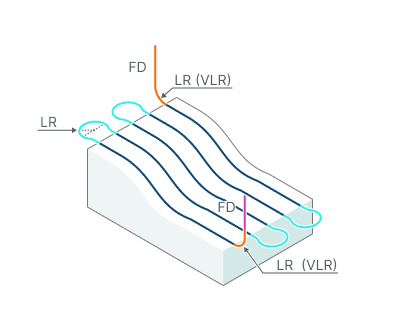
FD - Feed distance LR - Link radius VLR - Vertical Lead Radius