MachineMaker
  • MachineMaker
v3.1.1
Search Results for

    Show / Hide Table of Contents
    • MachineMaker
    • Introduction to MachineMaker
    • Interface
      • Main window
      • 3D navigation
      • Toolbar
      • Application Settings
    • Getting Started
      • Creating a project
      • Adding a mechanism
      • Prepare and import 3D objects
      • Grouping elements into nodes
      • Coloring
      • Mechanism Simulation and Validation
      • Assemblies
      • Mechanisms Library
      • Machine equipment configuration
    • Milling Machines
      • Building a kinematic scheme
      • Assembly options
      • Additional options
      • Examples: Machines
        • 3-Axes Milling Machine
        • 5-Axes Milling Machine
    • Robots
      • Building a kinematic scheme
        • Industrial Robots
        • Cobot
        • Heavy-Duty Robots
        • Flexible Heavy-Duty Robot
        • Tables and Positioners
        • Rails and Portals
        • Composite End effectors
      • Assembly Simulation and Validation
      • Table calibration
      • Receiving assemblies from CAM system
      • Assembly options
      • Additional options
      • Collision
      • Links/Leads
      • End effectors and TCP calibration
      • Examples: Robot cell
        • Simple robot
        • Heavy-Duty robot
        • Flexible Heavy-Duty Robot
        • Cobot
        • End Effectors
        • External Tools
        • Composite End Effector
        • Composite EndEffector: Spot Welding
        • Tables and User CS
        • Rail
        • H-bot (Portal)
        • SCARA Robot
        • Column-type robot
    • Turn-Milling Machines
      • Building a kinematic scheme
        • Chuck connector
        • Tool block
        • Turret head node
        • Dual-row tool turret
      • Multi Tool Head
      • Examples: Lathe milling machine
        • Lathe milling machine
        • Lathe milling machine with a dual-row turret
        • Swiss type machine
    • Simplifier

    Application Settings

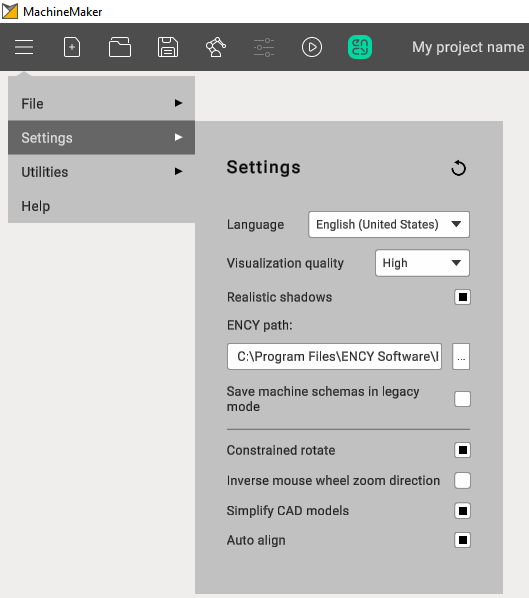
    Settings panel can be opened from Main menu.images/download/attachments/128546673/image2024-8-12_12-23-22.png
    General

    • Language. MachineMaker uses CAM system language by default but it is possible to change it here.
    • Visualization quality. Reduce quality if you have any problems with video memory or MachineMaker does not work smoothly enough. We recommend keeping High quality.
    • ENCY path. MachineMaker detects installed CAM system automatically. But it is also possible to specify ENCY path here.
    • Constrained rotate mode allows fixing Z axis during rotation. It is also possible to change this parameter from "Toolbar".
    • Inverse mouse wheel zoom direction. Change this parameter to inverse zoom behavior on mouse scroll.
    • Simplify CAD models allows you to reduce 3D model size. See "Prepare 3D models" page for details.
    • Auto Align. MachineMaker will automatically go through the imported 3D models and try to find optimal position for each new mechanism in assembly.
    In this article
    Back to top MachineMaker