Thread milling cycle
INCT_ThreadMillingCycleFormer - a CAM system interface that simplifies forming the movements of a thread milling cycle. The object implementing this interface is returned by the function INCT_CLData.CreateMillingCycleFormer when it is called with the mctThreadMilling parameter.
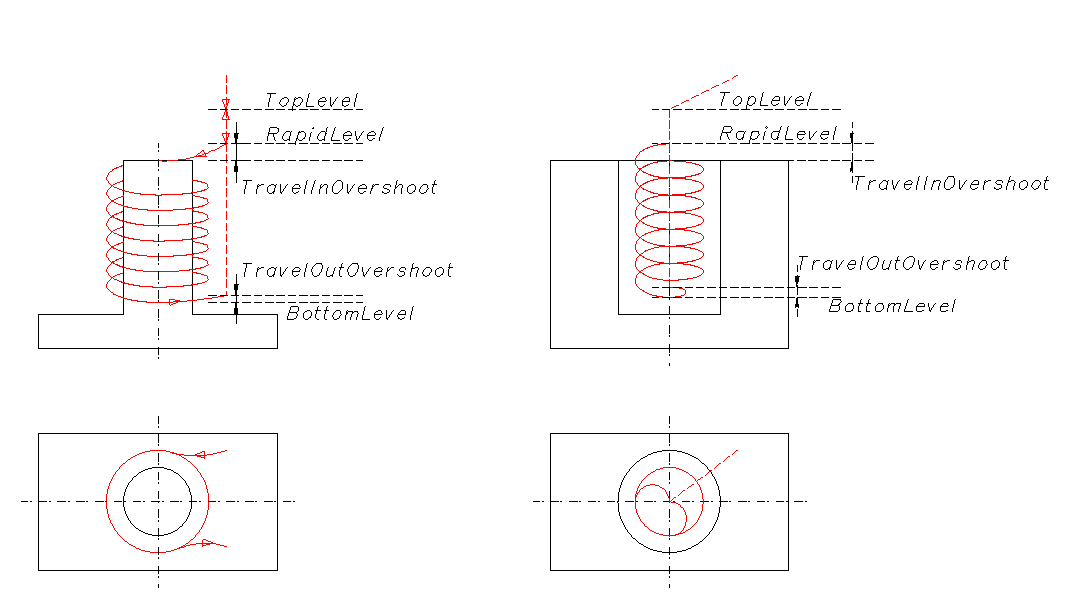
Purpose:
The movements in the various types of thread milling cycles generally follow the same tool path on different controllers:
- Approach of the tool to the initial level at rapid traverse.
- Approach of the tool to the travel-in overshoot level at rapid traverse.
- Approach along an arc or a helix to the milling start point at working feed (overshoot).
- Thread milling with the specified parameters (center, diameter, pitch) to the milling end level.
- Retraction along an arc or a helix at working feed at the travel-out overshoot level (overshoot).
- Return to the initial level at rapid traverse.
Example of such a cycle: Sinumerik: CYCLE90.
The generator forms the tool path from the specified parameters. It also allows adding to any section of the tool path the features required by a particular cycle, changing the feed type or value, or skipping a tool movement prepared by the generator.
Using the generator:
We recommend creating a new generator for each new cycle in a block of the NC program. Therefore, the interface of the old generator must be released when a new one is created or when the interpreter finishes its work.
To form the tool movement commands along the cycle path, do the following:
- Get the generator interface (INCT_CLData.CreateMillingCycleFormer).
- Set the indexes of the axes along which the movements are made (Set_AxisIndexes).
- Set the current plane (Set_Plane).
- Set the working feed (Set_Feedrate).
- Set the thread type (Set_ThreadType).
- Set the thread direction (Set_ThreadDirection).
- Set the thread pitch (Set_ThreadStep).
- Set the thread diameter (Set_Diameter).
- Set the thread center point (Set_CenterPoint).
- Set the approach level (Set_TopLevel).
- Set the safe plane level (Set_RapidLevel).
- Set the milling end level (Set_BottomLevel).
- Set the travel-in overshoot level (Set_TravelInOvershoot).
- Set the travel-out overshoot level (Set_TravelOutOvershoot).
- Assign a cycle event handler (Set_Events) if the cycle path needs to be changed.
- Form the tool movement commands along the cycle path (MakeWorkpath).
Description of the interface methods:
| Method | Method description |
|---|---|
| Set_AxisIndexes | The method sets the indexes of the X, Y, Z axes along which the movements are made when the cycle path is formed. Input parameters: Value (TNCDCAxisIndexes) - X (integer) - index of the X axis, Y (integer) - index of the Y axis, Z (integer) - index of the Z axis. No output parameters. |
| Get_AxisIndexes | The function returns the indexes of the X, Y, Z axes along which the movements are made when the cycle path is formed (TNCDCAxisIndexes). No input parameters. |
| Set_Plane | The method sets the current plane. Input parameter: Value (TNCPlaneType) - current plane. ptXY - XY plane, the thread is milled along the Z axis. ptYZ - YZ plane, the thread is milled along the X axis. ptZX - ZX plane, the thread is milled along the Y axis. No output parameters. |
| Get_Plane | The function returns the current plane (TNCPlaneType). No input parameters. |
| Set_ThreadType | The method sets the thread type. Input parameter: Value (TNCMillingThreadType) - thread type. mttInternal - internal; mttExternal - external. No output parameters. |
| Get_ThreadType | The function returns the thread type (TNCMillingThreadType). No input parameters. |
| Set_ThreadDirection | The method sets the thread direction. Input parameter: Value (TNCCircularMode) - thread direction. cmCW - clockwise; cmCCW - counterclockwise. No output parameters. |
| Get_ThreadDirection | The function returns the thread direction (TNCCircularMode). No input parameters. |
| Set_ThreadStep | The method sets the thread pitch. Input parameter: Value (real number) - thread pitch. No output parameters. |
| Get_ThreadStep | The function returns the thread pitch (real number). No input parameters. |
| Set_Diameter | The method sets the thread diameter. Input parameter: Value (real number) - thread diameter. No output parameters. |
| Get_Diameter | The function returns the thread diameter (real number). No input parameters. |
| Set_CenterPoint | The method sets the thread center point. Input parameter: Value (TNC2DPoint) - thread center point. No output parameters. |
| Get_CenterPoint | The function returns the thread center point (TNC2DPoint). No input parameters. |
| Set_TopLevel | The method sets the approach level. Input parameter: Value (real number) - approach level. No output parameters. |
| Get_TopLevel | The function returns the approach level (real number). No input parameters. |
| Set_RapidLevel | The method sets the safe plane level. Input parameter: Value (real number) - safe plane level. No output parameters. |
| Get_RapidLevel | The function returns the safe plane level (real number). No input parameters. |
| Set_BottomLevel | The method sets the milling end level. Input parameter: Value (real number) - milling end level. No output parameters. |
| Get_BottomLevel | The function returns the milling end level (real number). No input parameters. |
| Set_TravelInOvershoot | The method sets the travel-in overshoot level. Input parameter: Value (real number) - travel-in overshoot level. No output parameters. |
| Get_TravelInOvershoot | The function returns the travel-in overshoot level (real number). No input parameters. |
| Set_TravelOutOvershoot | The method sets the travel-out overshoot level. Input parameter: Value (real number) - travel-out overshoot. No output parameters. |
| Get_TravelOutOvershoot | The function returns the travel-out overshoot level (real number). No input parameters. |
| Set_Feedrate | The method sets the working feed. Input parameter: Value (real number) - working feed. No output parameters. |
| Get_Feedrate | The function returns the working feed (real number). No input parameters. |
| Set_MPM | The method sets the working feed units. Input parameter: Value (boolean) - working feed units. True - mm/min, False - mm/rev. No output parameters. |
| Get_MPM | The function returns the working feed units (boolean). No input parameters. |
| Set_Events | The method assigns events that control the cycle behavior. Events allow adding to any section of the tool path the features required by a particular cycle, changing the feed type or value, or skipping a tool movement prepared by the generator. Input parameter: Value (INCT_MillingCycleEvents) - object implementing the events. See the detailed description below. No output parameters. |
| Get_Events | The function returns the object implementing the events that is linked to the cycle generator (INCT_MillingCycleEvents). No input parameters. |
| MakeWorkpath | The method forms the cycle path from the specified parameters. |
INCT_MillingCycleEvents - an interface implemented in the interpreter that allows controlling the behavior of the thread milling cycle. The interface is a set of event methods executed during the tool movements inside the cycle path generator. With these methods, the features required by a particular cycle (dwell, oriented spindle stop, etc.) can be added to any section of the tool path, the feed type can be changed, or a tool movement prepared by the generator can be skipped.
If events are assigned to the cycle path generator, every tool movement inside the generator consists of 3 stages:
- The INCT_MillingCycleEvents.BeforeMove method is executed. It receives the values set by the cycle: movement type, coordinates of the movement point, feed type.
- The INCT_MillingCycleEvents.OnMove or OnArc method is executed, depending on the movement type: linear or along an arc.
OnMove receives: movement type, coordinates of the movement point, feed type and the flag of whether the movement has been made. All parameters except the movement type can be changed in the method implementation. Depending on the flag set in OnMove, the tool moves to the specified point with the specified feed, or the movement is not made.
OnArc receives: movement type, coordinates of the arc center and of the movement point, radius, feed type and the flag of whether the movement has been made. All parameters except the movement type can be changed in the method implementation. Depending on the flag set in OnArc, the tool moves to the specified point with the specified feed, or the movement is not made. - The INCT_MillingCycleEvents.AfterMove method is executed. It receives the values returned by OnMove or OnArc: movement type, coordinates of the movement point, feed type.
Description of the interface methods:
| Method | Method description | Description of use |
|---|---|---|
| BeforeMove | The method is executed before each tool movement when the cycle path is formed. Input parameters: MoveType (TNCMillingCycleMoveType) - movement type, see the description below; Point (TNC3DPoint) - coordinates of the movement point; Feed (TNCFeedType) - feed type. mmMoveToTopLevel - movement to the start point at the TopLevel level; mmMoveToRapidLevel - movement to the approach start level; mmTravelInMovement - approach to the thread along an arc; mmThreadMilling - thread milling; mmTravelOutMovement - retraction from the thread to the center along an arc; mmReturnToTopLevel - return to TopLevel. No output parameters. |
If some commands must be added before a movement, add them to the method implementation. For example, to turn on the machine coolant before thread milling, call INCT_CLData.AddCoolant with the appropriate parameters in the BeforeMove implementation under the condition MoveType = mmMoveToTopLevel. |
| OnMove | The method is executed immediately before each linear tool movement when the cycle path is formed. Input parameters: MoveType (TNCMillingCycleMoveType) - movement type, see the description above; Input and output parameters: Point (TNC3DPoint) - coordinates of the movement point; Feed (TNCFeedType) - feed type; Handled (boolean) - flag of whether the movement has been made inside the implementation (True - the movement has been made, False - it has not). If Handled is True after the OnMove call, the movement has been made inside the OnMove implementation, and the cycle generator does not add a movement command to the tool path. If Handled is False after the OnMove call, the generator considers that the movement has not been made inside the OnMove implementation and adds to the tool path a command to move to the point Point with the feed type Feed. |
To override the movement point or the feed, or to skip the movement. For example, to switch to rapid traverse when returning to the initial level after milling, in the OnMove implementation set the returned Feed parameter to ffRapid under the condition MoveType = mmReturnToTopLevel (for the feed type, see OutStandardFeed). To move the tool to a point other than the one calculated by the cycle, change the Point parameter returned by OnMove. If the movement to the point calculated by the cycle is not needed, set the Handled parameter to True inside the OnMove implementation. |
| OnArc | The method is executed immediately before each tool movement along an arc when the cycle path is formed. Input parameters: MoveType (TNCMillingCycleMoveType) - movement type, see the description above; Input and output parameters: Center, Point (TNC3DPoint) - coordinates of the center and of the movement point; Radius (real number) - arc radius; Feed (TNCFeedType) - feed type; Handled (boolean) - flag of whether the movement has been made inside the implementation (True - the movement has been made, False - it has not). If Handled is True after the OnArc call, the movement has been made inside the OnArc implementation, and the cycle generator does not add a movement command to the tool path. If Handled is False after the OnArc call, the generator considers that the movement has not been made inside the OnArc implementation and adds to the tool path a command to move along an arc to the point Point with the feed type Feed. |
To override the movement point or the feed, or to skip the movement. |
| AfterMove | The method is executed after each tool movement when the cycle path is formed, even if the movement has been canceled in OnMove or OnArc. Input parameters: MoveType (TNCMillingCycleMoveType) - movement type, see the description above; Point (TNC3DPoint) - coordinates of the movement point; Feed (TNCFeedType) - feed type. No output parameters. |
If some commands must be added after a movement, add them to the method implementation. |