Developing a custom interpreter in (.NET) C#
To create your own G-code interpreters based on .NET (C#), it is recommended to use a special tool. It is the Create interpreter item in the Utilities list.
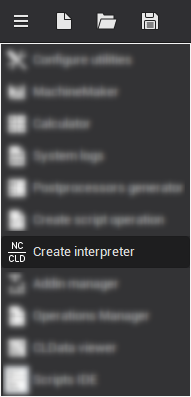
When you select the Create interpreter item, the corresponding window appears:
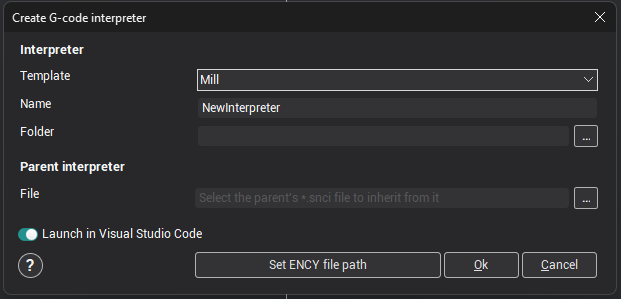
In this window you only need to fill in a few parameters, from which a template for your interpreter will be prepared:
- Template — the interpreter template;
- Name — the name of the interpreter being developed;
Warning
A directory with the same name is created from this name; it will contain all the source files of the new interpreter.
- Folder — the directory in which the folder of your interpreter will be placed (you can enter the value manually or use the directory selection dialog by clicking the corresponding button
 ).
- File — the full path to the settings file of the parent interpreter (*.snci) you want to inherit from (optional field).
- Launch in Visual Studio Code — a switch: if it is on, the interpreter folder opens in Visual Studio Code right after it is created.
After filling in all the required parameters, click the <Ok> button. As a result, a folder named after the interpreter is created in the directory you specified, and this directory immediately opens in Visual Studio Code (if the Launch in Visual Studio Code switch was on at that moment).
Note
Visual Studio Code must be installed on the computer beforehand.
What to fix after creation
The Create interpreter item copies the template and may not fill in everything. Before you build the interpreter and start debugging (F5), check the fields below and fix those that are filled in incorrectly. If all fields are already correct, skip this step.
- The version of the
EncySoftware.NCInterpreterSDK.Netpackage in the*.csprojfile: if it is a prerelease version (with a suffix such as-devor-rc) or a version of an older major version, replace it with the released version for your product version, as described in Product versions; otherwise the project may not build. - The
IDfield in the*.sncifile: if it is filled with zeros, enter a new GUID. - For a descendant interpreter, the reference to the parent:
ParentIDmust contain the parent'sID, andParentFileNamethe name of the parent's*.sncifile; without it the parent is not loaded. IfParentIDcontains the parent'sLibraryIDorParentFileNameis empty, fix them.
For details, see Where to start in the .NET workflow.